The networks are jealous of customers and usually we can only access the machines on your network from within the network itself. What comes to be known as an intranet.
But many of my maintenance tasks require access to multiple machines from a move to the intranet and client do not see a feasible option, nor in line with our times.
One solution I liked most is to ask a customer to access only a single machine with public IP address.
To provide security can be configured so that only they can be accessed from the IP address of your office, and to provide flexibility, which also can be accessed from the IP address of your server in a datacenter. Anyway this whole paragraph you can skip if there is not much problem with safety.
The machine with public IP mole that is linux, more than anything because if it is not because we do not need to keep reading because the rest of the article implied that premise.
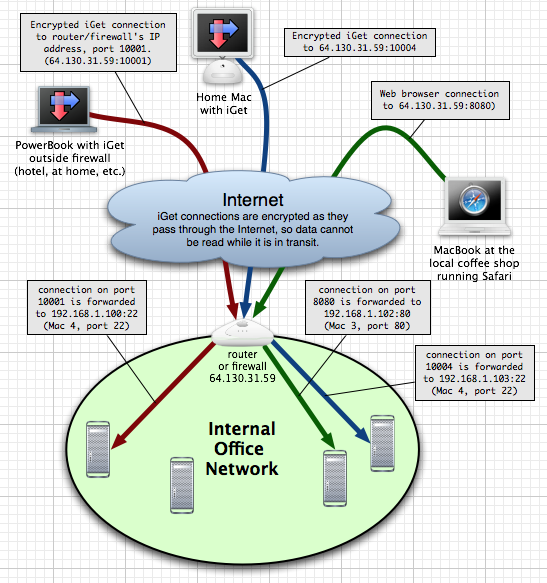
What we are going to do is what you see in the picture.
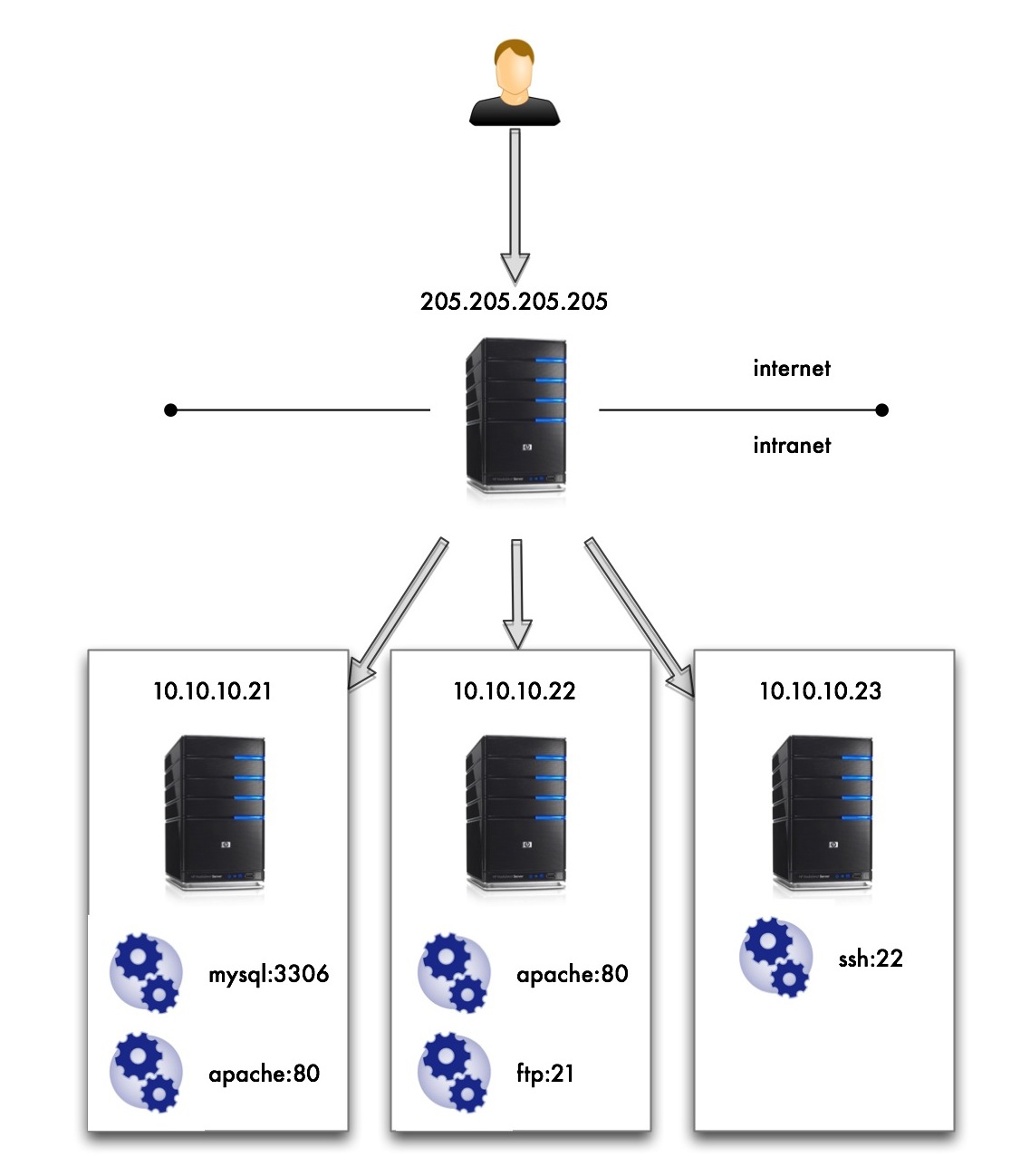
Here I see myself with more hair and beard without wishing to access all services of the machines on the intranet 10.10.10 .* and yet only being able to access the machine with public IP 205,205 .205.205 .
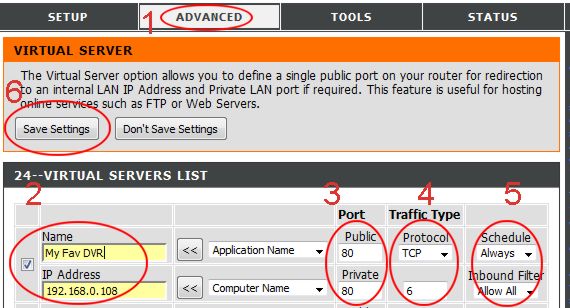
What I need is a name and this is Port Forwarding, and the implementation of this simpler than I’ve seen is made by IP Tables.
It’s going to be faster write commands to be run in order to make this work that all the talk after you have counted.
My machine with public access is the distribution of Gentoo Linux and that the examples are for this distro but should not vary much for other distros.
Install iptables (if not already )
We tell the kernel that allows ip-forwarding
Flash whole configuration of iptables that has default
Allow the forward from iptables (eth0 is the public interface )
This makes the ips are not rolling to mask the possible bypass roads and security filters for IP
And here at last the rules of the Port Forwarding
Keep the current iptables configuration so that the rewritten failure to restart
We service iptables to boot at the start
I think that also you have to do it
Add / uncomment the following lines:
And it should work. If I leave my machine in my office and I go to:
I find the mysql of the machine 10.10.10.21 .
If I go with a browser to:
I encounter with the Apache of the machine 10.10.10.22 .
But many of my maintenance tasks require access to multiple machines from a move to the intranet and client do not see a feasible option, nor in line with our times.
One solution I liked most is to ask a customer to access only a single machine with public IP address.
To provide security can be configured so that only they can be accessed from the IP address of your office, and to provide flexibility, which also can be accessed from the IP address of your server in a datacenter. Anyway this whole paragraph you can skip if there is not much problem with safety.
The machine with public IP mole that is linux, more than anything because if it is not because we do not need to keep reading because the rest of the article implied that premise.
What we are going to do is what you see in the picture.
Here I see myself with more hair and beard without wishing to access all services of the machines on the intranet 10.10.10 .* and yet only being able to access the machine with public IP 205,205 .205.205 .
What I need is a name and this is Port Forwarding, and the implementation of this simpler than I’ve seen is made by IP Tables.
It’s going to be faster write commands to be run in order to make this work that all the talk after you have counted.
My machine with public access is the distribution of Gentoo Linux and that the examples are for this distro but should not vary much for other distros.
Install iptables (if not already )
# Emerge iptables # Echo 1> / proc/sys/net/ipv4/ip_forward # Iptables-F # Iptables-t nat-F
# Iptables-A FORWARD-i eth0-j ACCEPT # Iptables-A FORWARD-o eth0-j ACCEPT
# Iptables-t nat-A POSTROUTING-o eth0-j MASQUERADE # Iptables-t nat-A PREROUTING-p tcp-i eth0 - dport 213,306-j DNAT - to-destination 10.10.10.21:3306 # Iptables-t nat-A PREROUTING-p tcp-i eth0 - dport 2180-j DNAT - to-destination 10.10.10.21:80 # Iptables-t nat-A PREROUTING-p tcp-i eth0 - dport 2280-j DNAT - to-destination 10.10.10.22:80 # Iptables-t nat-A PREROUTING-p tcp-i eth0 - dport 2221-j DNAT - to-destination 10.10.10.22:21 # Iptables-t nat-A PREROUTING-p tcp-i eth0 - dport 2322-j DNAT - to-destination 10.10.10.23:22
# / Etc / init.d / iptables save # Rc-update add default iptables # Vim / etc / sysctl.conf net.ipv4.ip_forward = 1 net.ipv4.conf.default.rp_filter = 1
$ Mysql-h205 205 . 205 . 205 P- 213,306
If I go with a browser to:
http :// 205,205 . 205 . 205 : 2280